Fluxly

Fluxly - Lightweight framework for portable, self-contained DAG-based workflows.


Introduction
Fluxly is a lightweight framework for building and running directed acyclic graph (DAG)-based workflows.
The entire workflow acts as a self-contained execution endpoint:
- Run them locally or via CLI commands, API calls, or environment triggers.
- Package them in containers for portability.
- Integrate seamlessly with higher-level orchestrators (Argo, Airflow, Prefect, CI/CD) without extra glue code.
With Fluxly, pipelines are highly structured, enabling safer execution, easier debugging, and better modularity.
Workflows can run standalone or as part of a larger system, making Fluxly both lightweight and flexible.
Why Fluxly (the problem it solves)
- Unstructured container pipelines become spaghetti: per‑container scripts, mismatched inputs/outputs, and duplicated retries/timeouts/logging without a shared wrapper.
- Heavy solutions like Airflow require schedulers, DBs, and webservers—great for platforms, heavy for simple, portable pipelines.
- Orchestrator‑centric SDKs (e.g., Prefect) add remote control planes and runtime coupling that don’t fit autonomous, fire‑and‑forget containers.
- Fluxly keeps logic structured and isolated inside a single repo and image: typed I/O models, explicit DAG, consistent entrypoints (CLI/API/env), and clear node boundaries. Any orchestrator can trigger it, but your code stays clean and portable.
- Ideal when each Docker should remain simple and self‑contained, with minimal coordination overhead.
- In monorepos—or by wrapping Fluxly—you can centralize shared services, typed inputs, validations, outputs, and metadata to fit org standards. This thin wrapper standardizes containers and removes boilerplate across pipelines.
Complex workflow
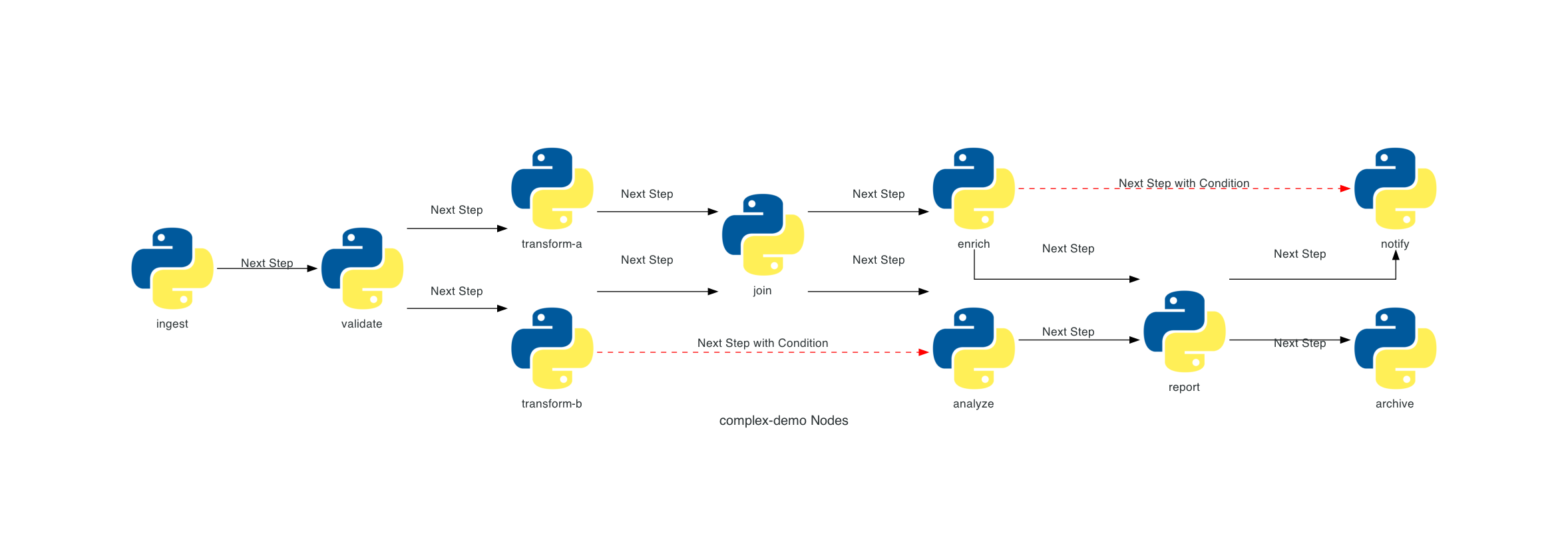
Clear representation of workflow DAG with branching and parallel execution.
Key Features
- Flexible entrypoints – workflows can be triggered via CLI, API calls, or environment variables.
- DAG-based workflows – define arbitrary connections between ndoes and their dependencies.
- Highly structured workflows – strict validation ensures safer pipelines, easier debugging, and predictable behavior.
- Self-orchestrated nodes – each node manages its own execution, retries, and dependencies.
- Lightweight building blocks – workflows are self-contained units that can run independently in any environment.
- Extensible by design – wrap workflows with custom classes to add logging, metrics, or integrations.
- Local-first development – debug and run workflows standalone, then scale seamlessly to CI/CD or external orchestrators.
Installation
Install Fluxly
pip install fluxly
Quick Start
1) Define Workflow Input
Define a typed WorkflowInput to specify all inputs your workflow expects.
These inputs are agnostic to how the workflow is triggered — they can come from CLI flags, API requests, or environment variables — giving you maximum flexibility.
WorkflowInput Example
from fluxly.workflow import WorkflowInput

class MyInput(WorkflowInput):
    message: str = "world"
2) Make nodes
Implement Node logic in _logic() and type-narrow workflow_input for convenience.
Node Example
from fluxly.node import Node

class Echo(Node):
    @property
    def workflow_input(self) -> MyInput:
        return self._workflow_input

    def _logic(self) -> None:
        self._logger.info(f"Echo: {self.workflow_input.message}")
3) Build a workflow
Create a Workflow, add nodes to it, and wire edges/conditions to express execution order and data dependencies.
Workflows orchestrate retries, timeouts, and overall execution.
Workflow Example
from fluxly.workflow import Workflow

def build_workflow() -> Workflow:
    wf = Workflow(name="demo", description="Demo flow", version="0.1")

    # Nodes: demonstrate node-level timeout and retries
    alpha = Echo(name="alpha", description="prints a message", timeout_seconds=5, max_retries=1, retry_delay_seconds=1)
    beta = Echo(name="beta", description="prints after alpha")
    gamma = Echo(name="gamma", description="conditional step")

    # Register nodes to the workflow
    wf.add_node(alpha)
    wf.add_node(beta)
    wf.add_node(gamma)

    # Edges (ordering and conditions)
    wf.add_edge(alpha, beta)  # run beta after alpha
    wf.add_conditional_edge(beta, gamma, condition=lambda: True)  # example condition
    # Alternatively, run a node only if its parent completed successfully
    wf.add_edge_if_source_completed(alpha, gamma)

    return wf
4) Expose Your Workflow
Use Fluxly to expose your workflow as a single, consistent entrypoint.
Inputs from your WorkflowInput are automatically mapped to CLI flags, API payloads, or environment variables, keeping your interface consistent and type-safe across all triggers.
Expose Workflow
from fluxly import Fluxly

if __name__ == "__main__":
    app = Fluxly()
    wf = build_workflow()
    # register workflow with its input type
    app.add_endpoint("my-workflow", wf, MyInput)
    app.run()  # can be triggered via CLI, API, or env vars
Run it via CLI:
Run CLI
python main.py my-workflow --message hello

# discover generated flags and help text
python main.py my-workflow --help
Trigger via HTTP POST request:
Run via API
import requests

url = "http://localhost:8000/my-workflow/run"
payload = {"message": "hello"}

response = requests.post(url, json=payload)
print(response.status_code, response.json())
Trigger via environment variables (with FLUXLY_ prefix):
Run via Environment Variables
export FLUXLY_MESSAGE="hello"
python main.py my-workflow
Generated Entrypoints (CLI and API)
Fluxly auto-generates a CLI menu and API routes per registered workflow.
CLI Menu
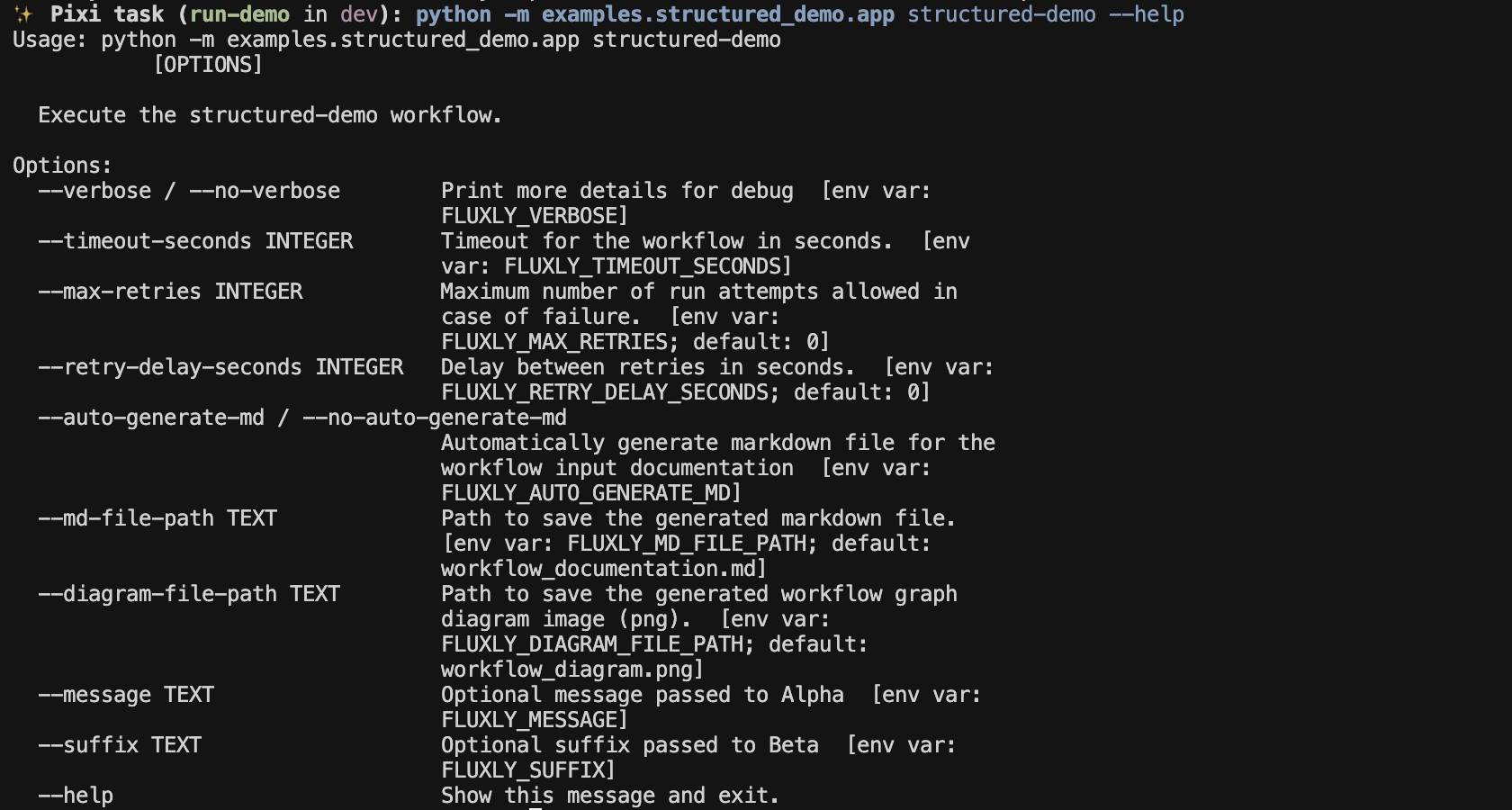
CLI commands generated for your workflows.
Swagger UI
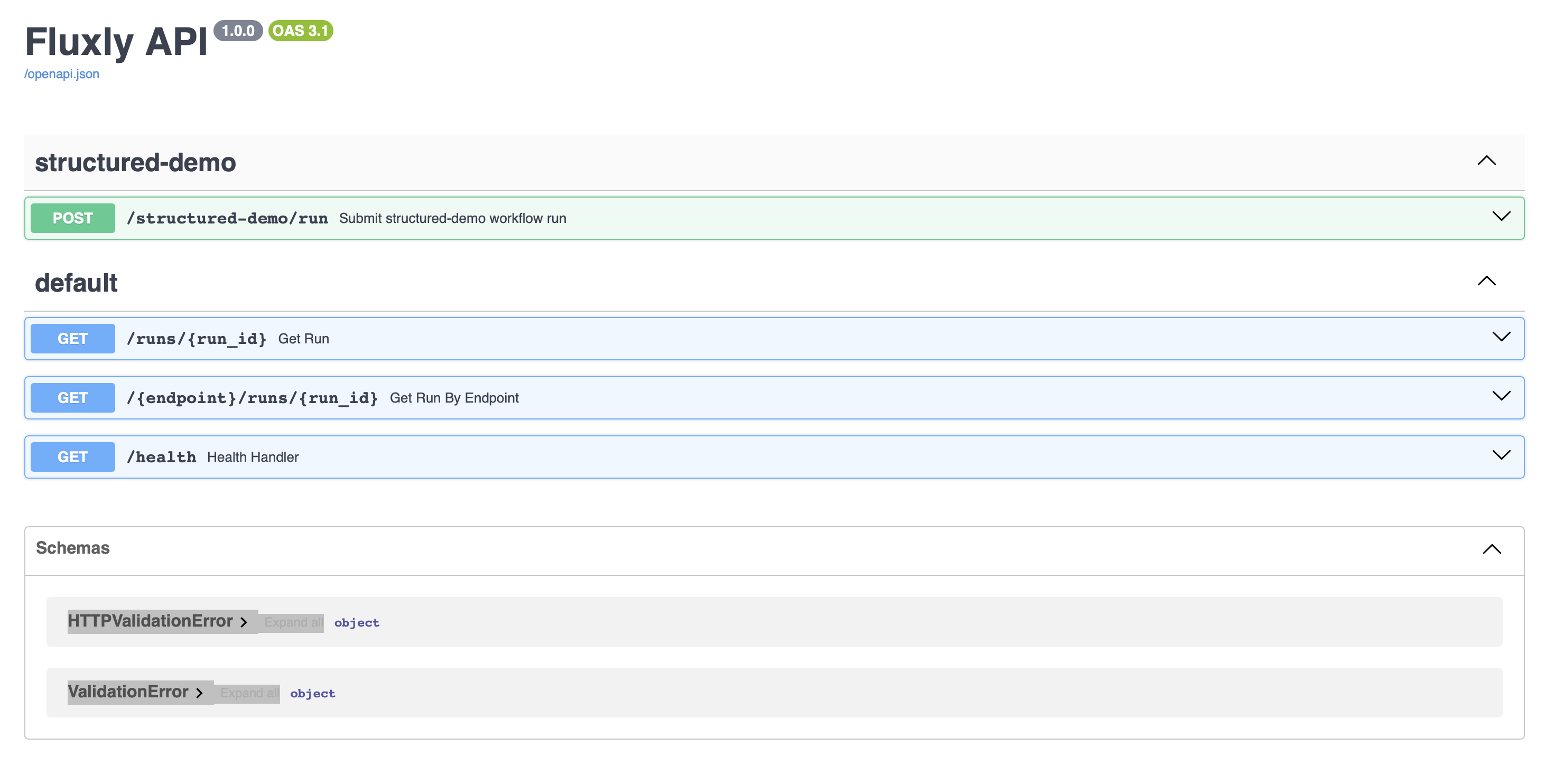
API endpoints for submitting runs and fetching statuses.
Where to go next
- Getting started: project layout, environment, and running the included demo — Getting started
- Core concepts: workflows, nodes, execution groups, orchestration controls, and node-to-node communication — Core concepts